SKU: 87208744526
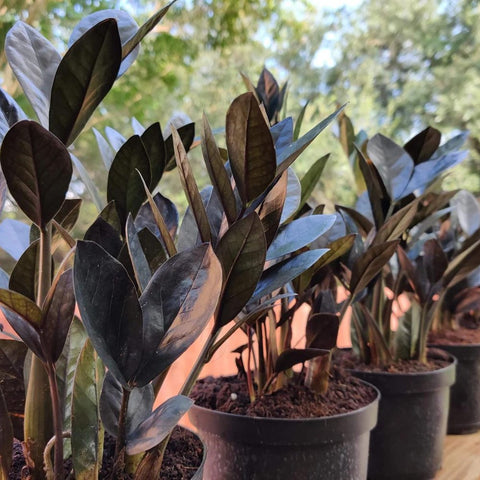
black zz raven plant

black zz raven plant Black ZZ Plant (Zamioculcas Zamiifolia ‘Raven’)

Sale price$25.02 Regular price$27.80
Save 10%

Shipping Estimate
USA
  • USA
  • CAN

Ships within 48 hours · Estimated delivery Jul 14 - Jul 19

Promo Codes Available:

For Your Every Summer RSVP, with Code: SUMMER15

Description

black zz raven plant Black ZZ Plant (Zamioculcas Zamiifolia ‘Raven’)Black ZZ Plant: Embrace the Exotic Beauty of the Zanzibar Gem Immerse yourself in the exotic beauty of the Black ZZ Plant (Zamioculcas zamiifolia), also known as the Zanzibar Gem. With its dark, glossy foliage and striking appearance, this live tropical plant adds a touch of intrigue and natural elegance to any indoor space. How to Grow Black ZZ Plant Cultivating the Black ZZ Plant is a rewarding endeavor. Follow these essential guidelines for

Black ZZ Plant: Embrace the Exotic Beauty of the Zanzibar Gem

Immerse yourself in the exotic beauty of the Black ZZ Plant (Zamioculcas zamiifolia), also known as the Zanzibar Gem. With its dark, glossy foliage and striking appearance, this live tropical plant adds a touch of intrigue and natural elegance to any indoor space.

How to Grow Black ZZ Plant

Cultivating the Black ZZ Plant is a rewarding endeavor. Follow these essential guidelines for successful growth:

  • Place your Black ZZ Plant in a well-lit location with indirect sunlight, although it can tolerate lower light conditions.
  • Use well-draining soil and allow the soil to dry out partially between waterings to prevent overwatering.
  • Maintain average room temperature between 60°F to 75°F (15°C to 24°C) for optimal growth.
  • Avoid placing the plant in cold drafts or exposing it to extreme temperature fluctuations.

Care Tips for Black ZZ Plant

Nurture your Black ZZ Plant with care and attention using these essential care tips:

  • Water the plant sparingly, allowing the soil to dry out between waterings to prevent root rot.
  • Provide moderate to high humidity levels by misting the leaves or using a humidifier, especially in drier indoor environments.
  • Avoid over-fertilizing the plant, as it is relatively low-maintenance and doesn't require frequent feeding.
  • Keep the leaves clean by wiping them with a damp cloth to remove dust and maintain their glossy appearance.

Uses of Black ZZ Plant

Explore the versatile uses of the Black ZZ Plant to enhance your indoor spaces:

  • Use it as a statement piece or focal point in your living room, bedroom, or office, creating an atmosphere of exotic beauty.
  • Incorporate the Black ZZ Plant into your indoor garden or botanical display, adding depth and texture to the arrangement.
  • Place it in a decorative pot or planter to complement your home decor and create a stunning visual impact.

Planting Tips for Black ZZ Plant

Ensure successful planting of the Black ZZ Plant with these tips:

  • Choose a well-draining pot or container with drainage holes to prevent waterlogging.
  • Use a quality potting mix formulated for indoor plants or a well-balanced succulent mix.
  • Place the plant in the center of the container, ensuring the roots are spread evenly.
  • Backfill the container with soil, gently pressing it around the roots to provide stability.
  • Water the plant lightly after planting, allowing any excess water to drain away.

Maintenance of Black ZZ Plant

Maintaining the beauty and vitality of your Black ZZ Plant is effortless with these maintenance tips:

  • Prune any yellow or damaged leaves to maintain the plant's appearance and promote healthy growth.
  • Monitor the plant for any signs of pests, such as mealybugs or spider mites, and take appropriate action if necessary.
  • Rotate the plant occasionally to ensure even growth and prevent leaning towards the light source.

Embrace the exotic beauty of the Black ZZ Plant (Zamioculcas zamiifolia), also known as the Zanzibar Gem, as it graces your indoor space with its striking and captivating presence.

Shipping Notes
  • Free Standard Shipping on $100+ Orders to the USA.
  • Except Preorder products are shipped in 48 hours.
  • Delivery to the USA:
  1. Standard Shipping : 3-10 business days
  • If time is of the essence, please consider selecting expedited delivery for faster service.
Exchange/Return Notes
  • We offer a 30-day return/exchange service after receiving.
  • Final sale items are not eligible for returns or exchanges.
  • To process your return/exchange, please contact us at [email protected]
  • Please click here for more details>>> Return & Exchange Policy
SKU: 87208744526

Discover Niche Categories That Outsell black zz raven plant

Top-Converting Item to Boost Your Average Order

4.8 ★★★★★
Based on 1594 reviews
Sort
Highest Rating
Newest First
Oldest First
Product Reviews
K
Verified Purchase
Kindle Customer
Lake Worth, US
★★★★★ 5
Easy to use
Size: 49ft, Number of Items: 6
Eay to use and comes off easy
WAS THIS REVIEW HELPFUL?YesReportShare
Reviewed in the United States on May 9, 2026
G
Verified Purchase
Greg
Massapequa, US
★★★★★ 5
Good product
Size: 49ft, Number of Items: 6
Works as advertised!
WAS THIS REVIEW HELPFUL?YesReportShare
Reviewed in the United States on May 7, 2026
J
Verified Purchase
Jennifer W.
Lexington, US
★★★★★ 3
Depends on your needs
Size: 49ft, Number of Items: 6
Good value for amount paid. It is NOT easy to tear, what so ever; you will need scissors for a clean edge. The 10mm size is not the best width for tshirt transfers, as it is difficult to pickup after pressing; however, it does well at holding the transfer in place.
WAS THIS REVIEW HELPFUL?YesReportShare
Reviewed in the United States on May 12, 2026
N
Verified Purchase
Nancy Lewis
Fort Morgan, US
★★★★★ 5
Heat resistant tape
Size: 49ft, Number of Items: 6
Just started in making things a friend suggested these tape
WAS THIS REVIEW HELPFUL?YesReportShare
Reviewed in the United States on April 26, 2026
T
Verified Purchase
Tay
Los Angeles, US
★★★★★ 5
A great printer with lower pricing
Style: ET-4800, Color: White, Set: FAX/ADF/Print/Copy/Scan
I am quite happy with my ET-4800 purchase. From wirelessly connecting to my Mac to software installation to adding the ink, it was easy to set up. I feel you can't go wrong with this level of ink capacity. It holds so much ink without the bother and added expense of frequently replacing cartridges. I will never go back to a cartridge machine. I don't care who makes it! I've used my printer several times so far, and each time it has done a great job by giving me the colors and clarity that I expected. This is the first printer that I've owned that wasn't a front-feeder. I wasn't sure how I would like that, but I've found that holding the paper straight and then dropping it into the slot rather than placing it, gives the best result for paper alignment. For my needs, I have only used it one sheet of paper at a time. So if you are wanting to load several sheets at once, your loading experience may be different from mine. But just make sure that you do not load more than 100 sheets at a time, per the manufacturer's instructions. Also, be sure that the movable paper guides are in the correct spots for the size of paper being used, without any buckling. To date, I have not used the scanner, but it is definitely a feature that I did not want to be without, so I'm looking forward to using it. The display window, though small, is simple to follow along with, and I appreciate that the angle of the keypad can be adjusted. Working with the Epson Smart Panel app gives a bit more flexibility, particularly if you're not right next to your printer and want to check the ink levels or start a printing job. To use the app, be sure that you turn on your printer first and that both the printer and your device are set to the same wi-fi, so that the app can find your printer and you can begin operating it from afar. Once inside of the app, be sure to check out the "Other Features Menu" from the app's homescreen. There is a link to another Epson app that can be used to boost your creativity and streamline layouts for collages, and a colorful guide full of project ideas that outline everything that you need for each project and how to execute them. There's even a feature for sharing what you've scanned and submitting it as an assignment. This is something that you'd want to read more about to see if it is an applicable and helpful addition for you. You can use the search term, "google classroom in epson smart panel app," to find out more. There is only one downside that I have found at this point. The pull-out paper catching tray in the front feels flimsy. It seems out of place on an otherwise sturdy machine. But so far, I've had no problems with it. I just take my time pulling it out, flipping down the end, folding it back up, and pushing the tray back in. I figure if I baby it a bit, then all should be well. Overall, I really like the Epson ET-4800 as much as my ET-5170. I feel it performs well at an acceptable price point.
WAS THIS REVIEW HELPFUL?YesReportShare
Reviewed in the United States on June 26, 2025

recommand products